Warning: Undefined array key "post_type_share_twitter_account" in /var/www/vhosts/casinonewsblogger.com/public_html/wp-content/themes/cryptocurrency/vslmd/share/share.php on line 24
BCPoker, one of the most promising newcomers to the world of crypto-first poker sites, has made another big step forward, introducing a self-developed client for Windows & Mac desktop computers and laptops.
Up until very recently, BCPoker players had to make do with a web-based interface, which did a pretty good job, but a standalone client that you can run on your machine remains the preference of most users. Plus, it gives the operator more room to improve the existing features and add new ones along the way.
The desktop platform also gets rid of one of the biggest issues, which is the browser lag. Moving forward, players can enjoy quick and lag-free games, significantly improving the overall user experience.
A Modern & Fun Platform
BCPoker’s desktop software has kept the basic design that existing players used to the browser-based platform will be familiar with, ensuring a seamless transition between the two.
The main menu to the left provides quick access to core sections, such as Texas Hold’em and Omaha cash games, tournaments, and Spin & Go games.
Individual lobbies feature a modern design with images and animations instead of just text. This is different from most poker platforms out there, so it may take a bit of getting used to. On the other hand, once you do, it’s much easier to take in the info about prize pools, table limits, number of players seated, etc.
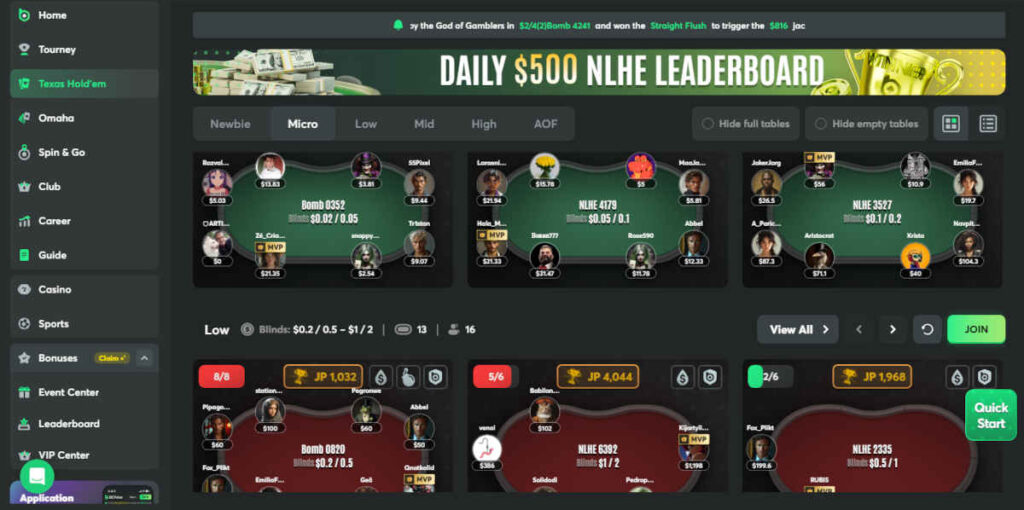
The software features a variety of filters inside each lobby, allowing you to quickly list specific games you’re interested in based on the type, stakes, registration status, and more. This is particularly useful for MTT players as tournaments are distributed in a number of relevant categories, such as Regular, Bounty, Freeroll, Weekly, Monthly, etc.
There is also the ‘Career’ tab, which gives you a full overview of your play on BCPoker, i.e., money won on cash game tables, prizes won in tournaments, and the full list of individual events. To have this kind of playing history at your fingertips is a really nice touch.
You can fire up to four tables at the same time, which should be enough for most players. The operator will probably increase this limit moving forward, but the traffic on the site is currently not suited for mass multi-tabling anyway, so this shouldn’t be too much of an issue.
Solid Range of Customization Options
The software also comes equipped with a variety of customization options that you’ll be able to access once you log in.
In terms of the appearance, BCPoker lets you choose from several different felt colors, deck styles, and even chip designs. There are currently four different decks to choose from, including the classic four-color design that makes it very easy to keep track of suits and avoid costly mistakes, especially when multi-tabling.
You also have a high degree of freedom when it comes to setting up your bet buttons, both before and after the flop. You can simply choose from preset options (of which there are many) or enter your own numbers, if that’s what you prefer.
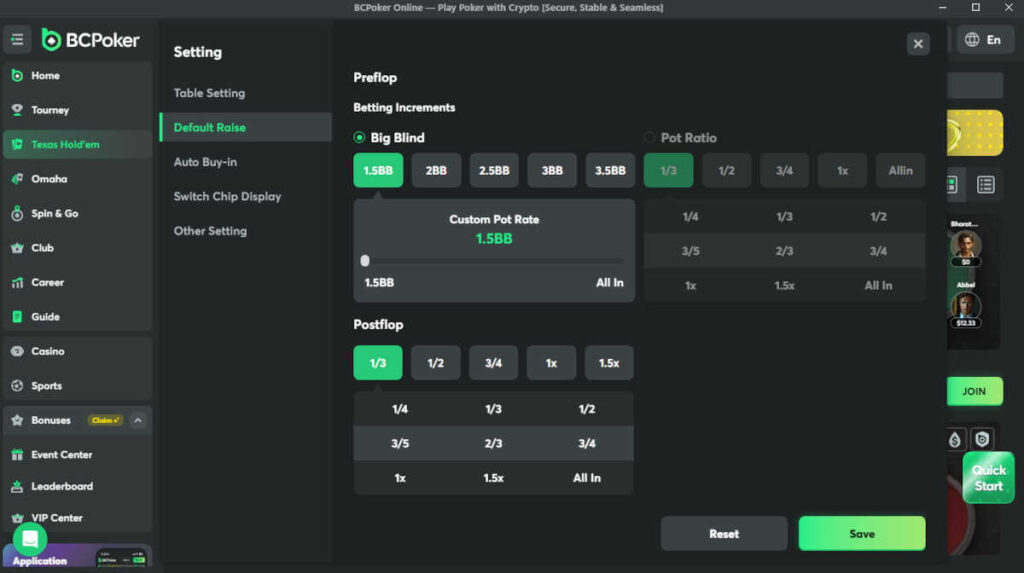
The auto buy-in setting is available as well, and you can turn it on and fine-tune it. For example, you can set it up so that every time you drop below 50 big blinds, your stack gets topped up to 100. Or, if you play a short-stack strategy, you can make it so that every time you drop below 15 big blinds, you get topped back up to 40.
All in all, BCPoker’s desktop software looks nice, performs well, and comes with a myriad of options and features one would expect from a modern poker site. We’ll see how it holds up once the traffic increases, but the initial verdict is very positive.